Clone a Campaign
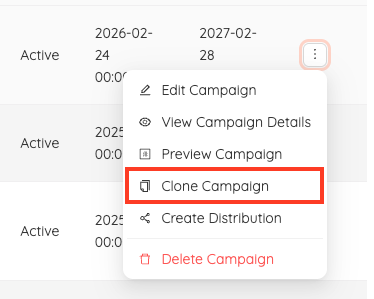
To speed up creating multiple coupons, use the Clone Campaign feature. This creates a copy of your current coupon and prompts you to update any fields as needed. This feature is located in the action tab for the corresponding coupon campaign.
Select Clone Campaign in the action tab
Adjust or confirm campaign details using the same process as creating a coupon. - For help creating a campaign check out our full campaign creation help doc located HERE.
Was this article helpful?
That’s Great!
Thank you for your feedback
Sorry! We couldn't be helpful
Thank you for your feedback
Feedback sent
We appreciate your effort and will try to fix the article